


Pricing manager — your cost, your display price, your margin, per plan.
Set the price your customers SEE and where “Buy now” sends them (your WhatsApp, your payment page — you collect the money). Your wholesale seat rate is unaffected.Nothing on this page changes what you pay. Your seat rate is fixed by your reseller discount.
Storefront currency
Your wallet is in INR or USD. What your customers see can be any currency.
The card spells out the consequence: “Display-only: your wallet, seat costs and top-ups stay in USD. Example: a $8.00 plan shows as AED 29.36.”
Press Save on this card specifically. It saves separately from the plan table below.
The plan table
Changes save automatically — the button top-right reads Saved once they have.
Exporting your tool list
Export in the page header downloads your full plan-by-plan tool list, so you can build product listings on your own store without retyping 170-plus tools.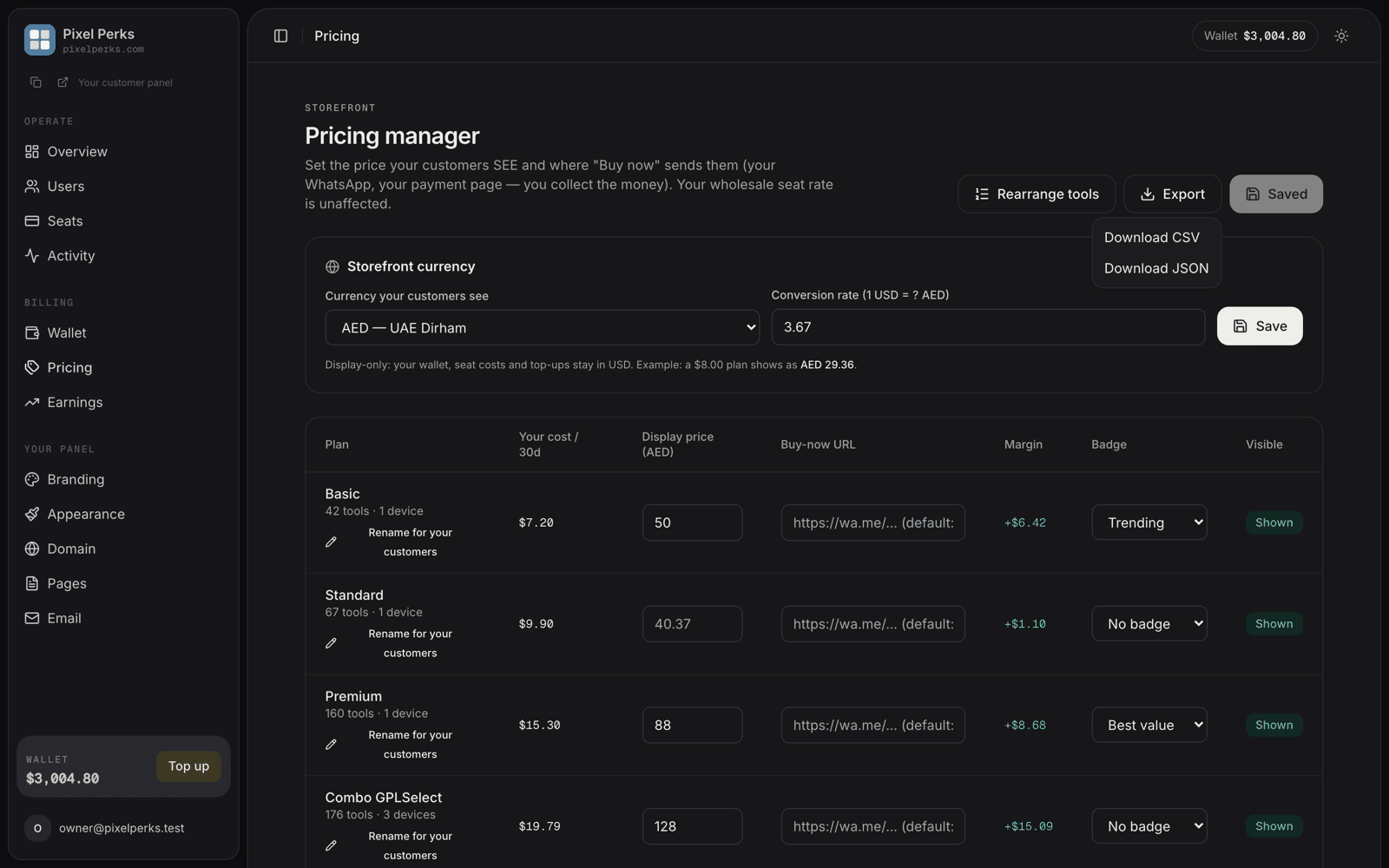
Export — the plan × tool matrix as CSV or JSON.
Download CSV
Tool and Category first, then one column per plan — using your own renamed plan labels — with
Yes marking inclusion. Opens straight in Excel or Google Sheets.Download JSON
The same matrix as structured data: a
plans array (id, name, slug, hidden) and a tools array (title, slug, category, and which plans include it). For wiring up your own storefront.Plans you have hidden are still included, marked
(hidden) in CSV and "hidden": true in JSON — so you have the full picture even for plans you sell privately.Files are named tools_export_<your-panel>_<date>. Cell values are sanitised so nothing in the file can execute as a formula when opened in a spreadsheet.Renaming plans for your customers
Under each plan name is Rename for your customers. Your customers should never see our plan names.
Renaming a plan — label, description and feature bullets.
Leave a field blank and the platform default is used. Clearing a field restores the default rather than showing an empty card — so you can rename one plan and leave the rest alone.
Badges
The dropdown offers options such as Trending and Best value, or No badge. The page explains the behaviour underneath:Badges show on your pricing page and give that plan the highlighted treatment on every layout. With no badges set, your middle plan is marked “Popular” automatically.
Buy-now URL — where your money is collected
This is the button your customers press to pay you. It accepts anhttps:// URL or a path on your own site, and defaults to your WhatsApp number.
Manual collection
Point it at
https://wa.me/…, bank-transfer instructions, or UPI. You assign the seat once paid. Most resellers start here.Automated checkout
Point it at your own payment link or gateway checkout. You still assign the seat once payment lands.
Pricing well
Know your floor
Know your floor
Your cost is in the table. Never price below it.
Leave room for refunds and support
Leave room for refunds and support
A margin that looks fine on one customer looks thin across fifty once refunds and support time are counted. Many resellers price at two to three times their seat cost.
Hide what you do not want to sell
Hide what you do not want to sell
Set Visible off for plans you sell privately or not at all, rather than pricing them out of reach.
Do not compete only on price
Do not compete only on price
Your support, your language and your local payment methods are worth more to your customers than being cheapest.