> ## Documentation Index
> Fetch the complete documentation index at: https://reseller-docs.gfxtoolz.ai/llms.txt
> Use this file to discover all available pages before exploring further.
# Earnings
> What you make — your selling prices against your seat costs, per plan, per month.
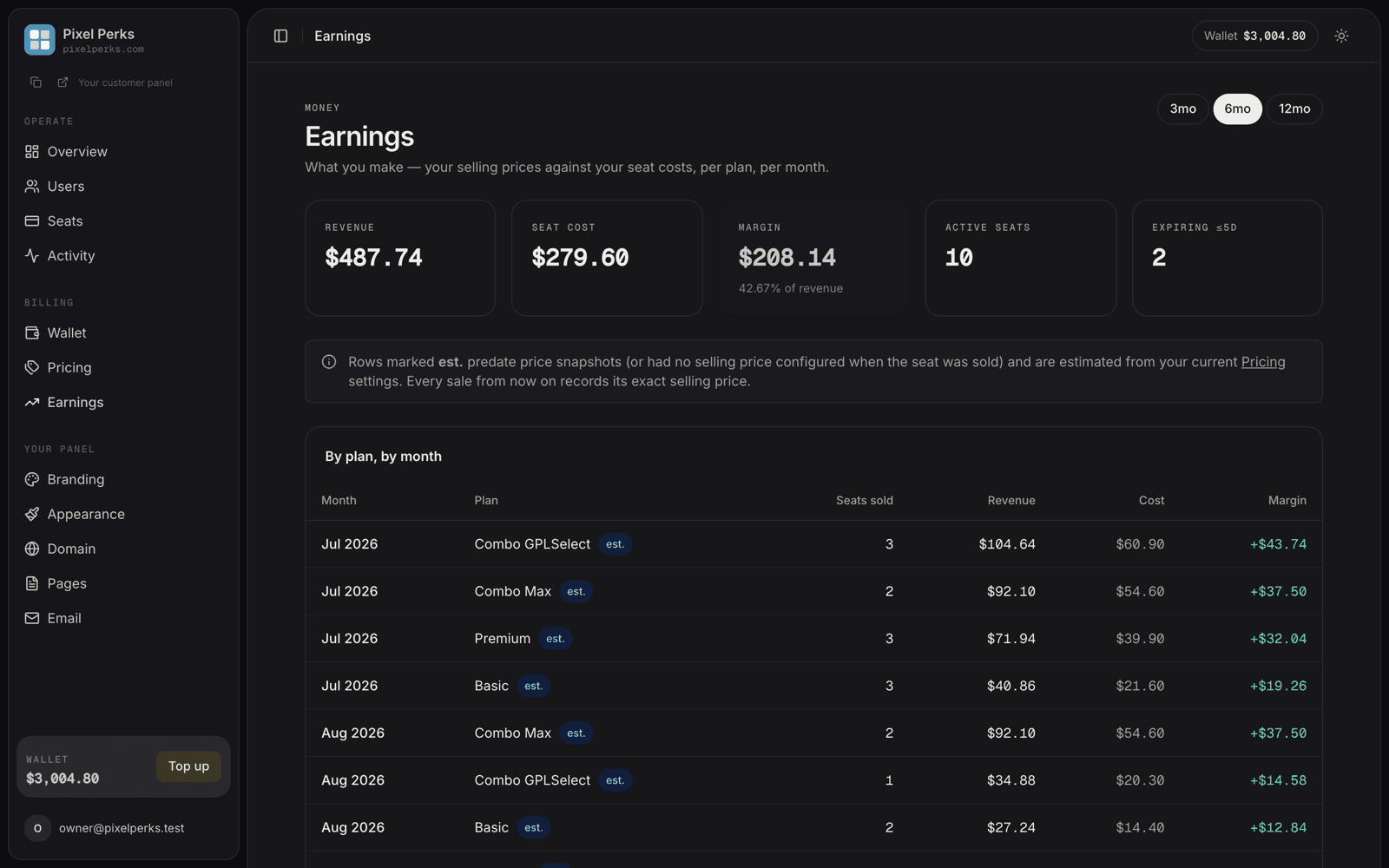
Every other money screen in the panel shows what you **spend**. Earnings shows what you **make**.
It sits under **Billing** in your sidebar and answers one question: after paying us for seats, what is actually left?
## The five cards
| Card | What it means |
| ---------------- | -------------------------------------------------------------- |
| **Revenue** | What your customers paid you, using your own selling prices. |
| **Seat cost** | What those same seats cost you from your wallet. |
| **Margin** | Revenue minus cost, with the percentage of revenue beneath it. |
| **Active seats** | Seats live right now. |
| **Expiring ≤5d** | Seats about to lapse — your renewal list. |
A negative margin is shown in red. If you see one, it almost always means a plan is selling below what the seat costs you, or has no selling price set at all.
## The table
Underneath, **By plan, by month** breaks the same figures down row by row: month, plan, seats sold, revenue, cost and margin. Switch the window with **3mo / 6mo / 12mo** in the top right.
Months are grouped in Indian Standard Time, and every figure is in your wallet currency.
## Where revenue comes from
This is the part worth understanding properly, because it decides whether your numbers are exact or approximate.
From this release onward, **every seat records the selling price you had configured at the moment you sold it.**
That snapshot never changes. If you raise your prices next month, last month's revenue stays exactly as it was — your history is not rewritten behind you.
Seats sold **before** this release carry no snapshot, so their revenue is estimated from your **current** pricing settings and marked with an `est.` chip.
The same applies to any seat sold while that plan had no selling price configured.
An `est.` row is an approximation, not a record. As older seats age out, the `est.` chips disappear on their own.
If a plan has **no selling price at all**, its revenue counts as `0` while its cost stays real — which shows up as a large negative margin. That is a configuration gap, not a loss. Set your prices on the [Pricing manager](/panel/pricing) and the figures correct themselves.
## A note on currency
If your storefront shows a different currency from your wallet — euros to your customers, dollars in your wallet, for example — revenue is converted back to your wallet currency using the rate you set on the Pricing manager.
Only transactions in your **current** wallet currency are included. If your wallet currency was changed at some point, older rows in the previous denomination are excluded rather than added to a total that would be meaningless.
Read this page alongside **Expiring ≤5d**. A plan with a healthy margin and seats about to expire is the single most profitable thing you can act on in a given week — see [Expiry reminders](/customize/email-reminders) to automate the chase.