> ## Documentation Index
> Fetch the complete documentation index at: https://reseller-docs.gfxtoolz.ai/llms.txt
> Use this file to discover all available pages before exploring further.
# Expiry reminders
> Automatic emails 7, 3 and 1 days before a seat expires — in your branding, from your mail server.
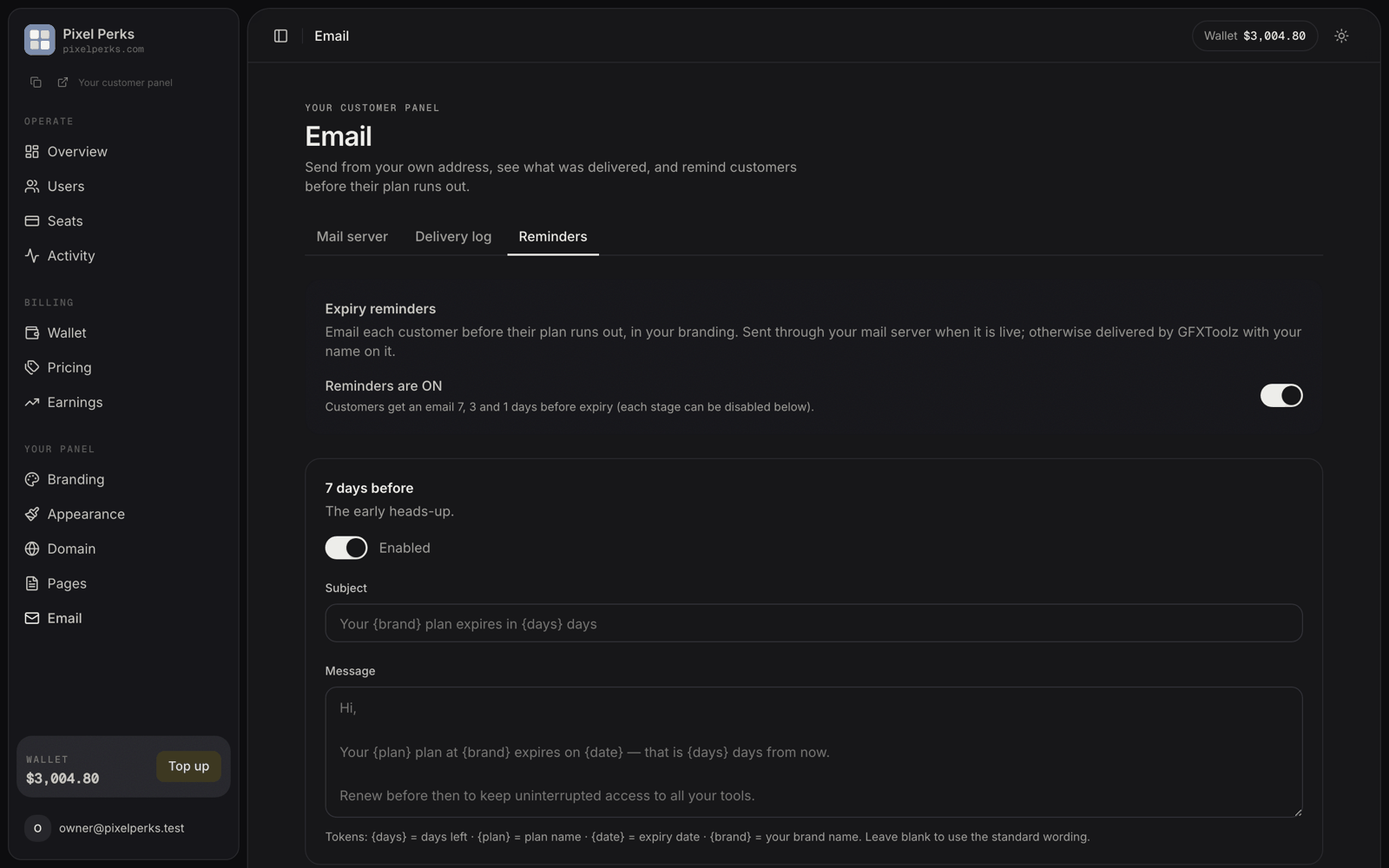
Without reminders, a seat simply stops working on its expiry date. The customer often does not notice until something breaks, and by then they have moved on. That is silent lost revenue.
**Email → Reminders** emails each customer **7, 3 and 1 days** before their seat expires — in your branding, through your own mail server when you have one.
This is **off by default**. Nothing is sent until you turn the master switch on. We made it opt-in so no reseller's customers received unexpected mail on release day — but it means the feature earns you nothing until you enable it.
## The controls
| Control | Behaviour |
| -------------------- | ------------------------------------------------------------------------ |
| **Master switch** | Off by default. Turning it on enables all three stages at once. |
| **Per-stage switch** | Each of the 7-day, 3-day and 1-day cards can be turned off individually. |
| **Subject** | Up to 120 characters. Leave blank to use the standard wording. |
| **Message** | Up to 2,000 characters. Leave blank to use the standard wording. |
## Personalisation tokens
Use these in either the subject or the message, and they are replaced when the email is sent.
| Token | Becomes |
| --------- | ----------------------------------- |
| `{days}` | Days remaining — 7, 3 or 1 |
| `{plan}` | The plan's name |
| `{date}` | The expiry date, e.g. *4 Sept 2026* |
| `{brand}` | Your brand name |
The default 7-day subject, for example, is `Your {brand} plan expires in {days} days`.
## How the sending works
The job runs daily at **09:30 IST** and picks up every seat that is exactly 7, 3 or 1 days from expiry.
Each seat gets each stage **at most once** per billing period, even if the job runs again.
Extending a seat moves its expiry date, and the new date gets its own fresh 7 / 3 / 1 reminders.
Sent through your mail server when enabled, otherwise delivered by us with your branding — exactly like invites.
Every reminder carries a **Renew now** button pointing at your own pricing page — your custom domain if you have verified one, otherwise your panel address.
## Safety of custom wording
Your wording is treated as **plain text**. If you paste HTML or a script into the message, your customer sees it as literal text; it is never executed in their inbox. Line breaks are preserved.
The wording is set per reseller, not per customer. All your customers at a given stage receive the same message with their own plan name and dates filled in.
## Checking they went out
Every reminder appears in the [Delivery log](/customize/email-log) like any other email, with the same delivery status.
Turn this on before you do anything else in this release. It is the only feature here that makes money the day you enable it — the seats it recovers are ones you are currently losing without ever knowing.